



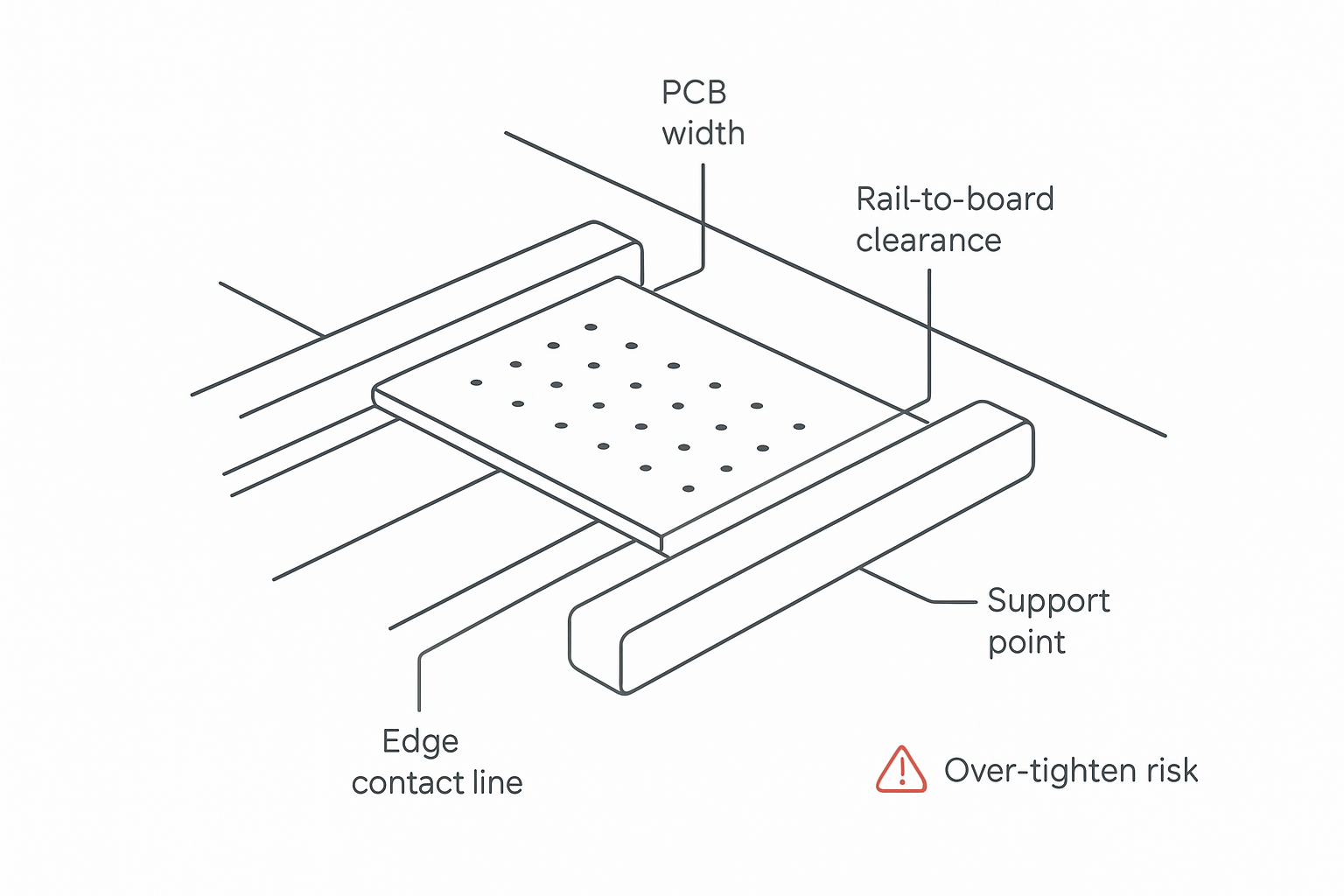
High-mix SMT lines live or die on changeovers. You can optimize printer programs and pick-and-place feeders all day, but if boards don’t travel consistently between machines, FPY and OEE will still get hit by micro-stops, false inspection calls, and transport damage.
That’s why PCB conveyor width adjustment should be treated like a controlled process change—not a casual knob turn.
Set rails too tight and you’ll see edge scuffing, intermittent jams, and mechanical stress that can make an already warpage-prone PCB behave worse through printing, placement, and reflow. Set rails too wide and boards can yaw, skew, or rock—showing up as inconsistent stop positions, fiducial reading issues, or “mystery” AOI defects.
This guide gives you a decision-stage, implementation-first SOP for setting conveyor rail guides across different PCB sizes, with verification steps and documentation fields you can standardize for repeatable changeovers.
主な収穫: Rail setup should support the PCB—not clamp it. Symmetry, controlled clearance, and a short verification run prevent warpage-sensitive escapes and transport-induced defects.
Key takeaways
A stable setup balances three goals: (1) no clamping stress, (2) no lateral wandering, (3) consistent underside support.
For high-risk boards (thin, large panels, heavy assemblies), rails alone may be insufficient—use fixtures/pallets or add underside support.
Warpage control is multi-factor; process engineering literature emphasizes combined levers (design, manufacturing, reflow/pallet strategy) rather than one “magic” fix. See Aravamudhan & Combs’ SMTA paper on a multi-faceted warpage reduction approach.
A documented SMT changeover checklist makes width changes faster and reduces operator-to-operator variation.
PCB conveyor width adjustment: quick setup targets
Before the detailed SOP, align on what “correct” means for your line:
Stable guidance: the PCB should not yaw or wander, especially at sensors and stoppers.
No clamping stress: insertion between rails should not visibly flex the board.
Repeatable interfaces: printer/AOI stop position should be consistent after changeover.
Documented setting: every product has a recorded setting reference (scale, gauge, or recipe).
If you’re optimizing for PCB warpage prevention, treat rail setup as one control lever in a broader system (board design, handling, thermal profile, and fixture strategy).
What can go wrong when rail guides are set incorrectly
Most rail setup problems fall into three buckets. Diagnose the bucket first; the corrective action is different.
1) Mechanical damage (direct handling defects)
Symptoms:
edge scratches and rub marks
solder mask abrasion along the rail contact line
denting on thin boards (especially at corner entry)
Common causes:
rails set too tight or unevenly
burrs/wear on rail surfaces
dirty rails increasing friction
entry/exit guide blocks misaligned (pinch point)
2) Transport instability (alignment and repeatability defects)
Symptoms:
board yaw/skew at sensors or stoppers
inconsistent stop position at printer/AOI interfaces
intermittent “board not present” signals
Common causes:
rails too wide for the board width and stiffness
board rocking due to uneven underside support
worn belts/rollers or misaligned support blocks
3) Warpage sensitivity (process-related escapes that rail setup can worsen)
Warpage isn’t “caused by conveyors” in a simple way, but rail-induced stress can take you from “within margin” to “fails at reflow or inspection.”
Setup can worsen warpage sensitivity when:
the PCB is thin/large and rail contact introduces bending stress
the board is constrained during thermal expansion, then released downstream
the edge contact line is inconsistent between boards
Define the target outcome: support without clamping
A good rail setting is not “as tight as possible.” It’s stable, repeatable guidance with minimal side loading.
Use this mental model:
Edge guidance: rails define the lateral position and prevent wandering.
Underside support: belts/rollers/support rails prevent sag and rocking.
Freedom to expand: during thermal steps, boards need just enough freedom to avoid binding and stress concentration.
If the PCB visibly flexes while you place it between rails, you are clamping.
Before you touch the rails: collect the minimum input data
For each PCB or panel in the changeover, capture:
Overall width (include breakaway rails, tabs, protrusions)
Thickness and whether it’s known to be flexible
Panelization details (tabs, tooling holes, breakaway rails)
Edge keepout constraints (components close to edge, fragile connectors)
Mass/stiffness (heavy assemblies bend more under their own weight)
Critical interfaces (printer, SPI, pick-and-place, AOI, reflow entry—where boards are stopped or referenced)
Pro Tip: If engineering has a board-handling note on the traveler (fixture required, edge keepout, maximum contact line), treat it as a setup requirement.
When rail setup alone is enough vs. when you need fixtures/pallets
A fast decision gate:
Rail setup alone is usually enough when
the board is stiff enough to avoid sag across conveyor spans
components and connectors have safe edge clearance
you have stable stop positioning and no jam history
Add a fixture/pallet or underside support when
the board is thin or has a long unsupported span
the assembly is heavy or top-loaded
you see warpage-driven opens/shorts or inspection instability
the panel design includes outriggers or asymmetrical stiffness
A commonly recommended warpage prevention measure is using pallets/fixtures and controlling process handling conditions as part of an end-to-end strategy.
Conveyor rail guide design variants (why your adjustment method matters)
Different conveyors implement width adjustment in different ways. Understanding the mechanism helps you avoid setup errors.
Fixed rail + moving rail
One rail is fixed; the opposite rail moves. This is common and simple, but it raises a key risk: you can unintentionally shift the PCB centerline during a changeover.
Control point: use a reference mark or “known centerline” method so the PCB’s expected stop position at interfaces remains consistent.
Dual-rail symmetric adjustment
Both rails move symmetrically toward/away from the centerline. This makes it easier to keep the transport centerline stable across different PCB sizes.
Control point: verify symmetry at multiple points along the conveyor length.
Manual vs. motorized adjustment
Manual handwheel adjustments are common and reliable, but they depend on operator technique. Motorized (recipe-based) adjustment can reduce variation when you’re running frequent product changeovers.
Control point: regardless of method, you still need a verification run. “Automatic” does not mean “validated.”
Step-by-step SOP: rail spacing and guide setup (Decision-stage)
This is a procedural SMT conveyor setup method designed for repeatability. Each step includes a measurable “done when.”
Step 0 — Safety and changeover readiness
Input: changeover window, required tools, ESD/safety policy
Action:
Follow your lockout/tagout and ESD rules for the conveyor segment.
Ensure upstream and downstream machines are in a safe state for a dry run.
Output: safe access to adjustment points
Done when: the conveyor can’t start unexpectedly and interlocks are satisfied.
Step 1 — Clean and inspect rail contact surfaces
Input: rails, support blocks, belts/rollers, entry guides
Action:
Remove dust, solder balls, and flux residue.
Inspect rail edges for burrs or wear that could increase friction.
Verify entry/exit guide blocks are aligned and not creating a pinch.
Output: consistent contact surfaces
Done when: rails are clean, smooth, and aligned at entry/exit.
Step 2 — Establish a neutral baseline (symmetry first)
Input: rail adjustment mechanism and any reference marks
Action:
Bring rails to a known baseline setting (your line’s standard).
Adjust both rails to be symmetric relative to the conveyor centerline whenever possible.
Output: symmetric baseline ready for fine setting
Done when: both rails respond evenly and appear parallel.
Step 3 — Set rail width using a clearance concept (support without pressure)
Input: PCB width, edge keepout constraints
Action:
Adjust rails to guide the PCB with minimal lateral play.
Avoid side pressure that deflects the PCB.
Ensure the rail contact line is compatible with the edge keepout.
Output: rails set for stable guidance
Done when: the board can be placed and slid through without visible flexing or edge rubbing.
⚠️ Warning: Tight rails can create heat-amplified stress on warpage-prone boards. If you see deflection during insertion, you are clamping.
Step 4 — Verify parallelism along the full span (entry → middle → exit)
Input: a representative dummy/scrap board
Action:
Check that the “feel” of clearance is the same at entry, middle, and exit.
Look for taper: a rail can be correct at the knob but tight downstream.
Output: consistent spacing through the transport path
Done when: the board does not encounter a tight spot and does not rattle in wider zones.
Step 5 — Confirm underside support and stability at stop points
Input: support rails, belts/rollers, stoppers
Action:
Confirm the PCB does not rock when gently pressed near corners and center.
Verify the board contacts the stopper squarely at interfaces.
Output: stable board behavior at reference locations
Done when: the board is stable and repeats its stop position without yaw.
Step 6 — Dry run at production speed
Input: dummy board, production conveyor speed, sensor and stopper logic
Action:
Run the dummy board at the same speed used in production.
Observe sensor triggers, stopper timing, and any hesitation.
Output: validated transport behavior
Done when: the board passes without hesitation, skew, or edge marks.
Step 7 — First-article verification (transport + process interfaces)
Input: first production board after changeover
Action:
Inspect edges for rub marks.
Verify interface stop repeatability at printer/AOI.
For warpage-sensitive assemblies, add a post-reflow check for any new warpage-related symptoms.
Output: confirmed readiness for stable production
Done when: no handling damage is visible and interface positioning is repeatable.
Step 8 — Document the setup so the next changeover is fast
Input: digital/paper changeover form
Action: record:
product/PCB name and revision
rail setting reference (gauge, scale value, recipe ID)
whether fixtures/pallets were used
special notes (edge keepouts, fragile connectors, stop position offsets)
Output: repeatable setup record
Done when: another technician can reproduce the setup without trial-and-error.
A practical SMT changeover checklist (rail setup)
Use this checklist as a controlled release gate. Each item is binary.
Rails cleaned and visually inspected (no debris, no burrs)
Entry and exit guides aligned (no pinch points)
Rails adjusted symmetrically or centerline maintained with reference method
Board can be inserted without visible deflection
Parallelism checked at entry/middle/exit
Board does not rock; underside support verified
Dry run completed at production speed without skew/jam
First-article edges inspected (no rub marks)
Interface stop repeatability confirmed at printer/AOI
Setup record completed (settings + special notes)
Risk-based setup matrix: what to change for high-risk boards
Board condition | Primary risk | What to prioritize in rail setup | When to add support/fixture |
|---|---|---|---|
Thin / flexible PCB | sag + thermal warpage sensitivity | minimize side pressure; stabilize underside support | if board rocks, sags, or shows warpage symptoms |
Large panel / long span | gravity sag + uneven constraint | verify parallelism along full span; stable stoppers | if span is long or panel bows during heating |
Heavy assemblies / tall parts | tipping + rocking | stable underside support; gentle stopping | if board rocks or stop position varies |
Edge features near rails | mechanical damage | avoid contact line conflicts; verify edge keepout | if edge rub marks appear |
Tabs / breakaway rails | snagging + skew | entry/exit guide alignment; watch for catching | if intermittent jams occur |
Troubleshooting: symptoms → likely cause → corrective action
Symptom: intermittent jams right after width adjustment
Likely causes:
rails tight in one segment
debris increasing friction
entry/exit pinch points
Corrective actions:
re-check spacing across entry/middle/exit (Step 4)
re-clean and inspect rails (Step 1)
adjust entry guides to remove pinch points
For a deeper diagnostic workflow, see PCB conveyor jamming problems and prevention tips.
Symptom: edge rub marks or solder mask abrasion
Likely causes:
rails set too tight
burrs or worn rail surfaces
Corrective actions:
reduce side pressure until insertion shows no deflection
address burrs/wear; confirm rails are clean
Symptom: AOI misalignment or inconsistent stop position
Likely causes:
rails too wide, allowing yaw
board rocking due to insufficient underside support
Corrective actions:
narrow rails until yaw is controlled without clamping
add underside support or switch to fixture/pallet
Symptom: warpage-related defects increase after product mix change
Likely causes:
warpage-prone boards running without fixtures
rail-induced constraint combined with thermal expansion
Corrective actions:
move high-risk boards to fixtures/pallets
confirm rails do not induce deflection
review end-to-end warpage controls (design, handling, reflow strategy)
How rail setup connects to OEE and FPY
A rail setup process that is measurable and documented shows up in metrics:
Setup time improves when you reuse documented settings rather than tuning from scratch.
Micro-stops drop when sensors and stoppers see consistent board behavior.
Yield/FPY improves when you prevent edge damage and reduce positional variability that triggers false rejects.
If you’re designing or upgrading a line, use conveyor interfaces and buffering as part of the conversation. This internal resource is a good starting point: PCB conveyor system design (ultimate guide).
Where S&M (Chuxin SMT) conveyors fit in an equipment decision
If you’re evaluating a conveyor upgrade (not just procedural improvement), include these decision criteria in your vendor scorecard:
manual vs. recipe-based width adjustment (repeatability in high-mix)
interface signal compatibility and diagnostics
mechanical stability at stop points (printer/AOI interfaces)
maintenance accessibility and spare parts support
For context on conveyor types and interfaces:
よくあるご質問
Does changing rail spacing really affect warpage?
Warpage is primarily driven by PCB design, materials, and thermal profile, but rail spacing can add mechanical constraint and stress. On boards already near the edge of process margin, that extra stress can translate into more instability and defects.
How do I know if rails are too tight?
If inserting the board causes visible flexing, if you see rub marks, or if boards intermittently jam at the same segment after changeover, you’re likely applying too much side pressure.
What’s the fastest way to reduce changeover variation?
Use a documented SMT changeover checklist with a repeatable setting reference (scale, gauge, or recipe), and require a short dry run + first-article inspection before releasing the lot.
Next steps (decision-stage)
If you’re seeing recurring changeover downtime, edge damage, or warpage-sensitive escapes, the fastest path is usually a short, structured audit:
identify which boards are “high risk” and should run on fixtures/pallets
standardize a rail setup + verification checklist
map interface stability (stoppers/sensors) to your real defect modes
Need an engineering review of your conveyor interfaces and width-adjustment changeovers? Contact S&M Co.Ltd (Chuxin SMT) to review your board mix, interface points, and conveyor configuration—and to recommend a setup strategy or conveyor upgrade path that reduces micro-stops and protects sensitive assemblies.
References
Aravamudhan, Srinivasa; Combs, Christopher. “Multi-Faceted Approach to Minimize Printed Circuit Board Warpage in Board Assembly Process” (SMTA International 2016)
Rush PCB. “Preventing Warpage during PCB Assembly” (updated 2025)